 | Complete 10 python programs which focus on loops. |
morgan | |
 | Score over 100 points in total |
vincebanter10 | |
 | Complete any 5 python programs |
vincebanter10 | |
 | Complete 3 python list based tasks |
vincebanter10 | |
 | Complete 5 python list based tasks |
vincebanter10 | |
 | Complete 10 python list based tasks |
dman12 | |
 | Score over 1000 points in total |
april-logan | |
 | Complete any pygame task |
april-logan | |
 | Complete any 3 pygame tasks |
april-logan | |
 | You have to complete 5 pygame tasks |
april-logan | |
 | Score over 500 points in total |
sam-edmund | |
| Complete any pygame task |
sam-edmund | |
| Complete any 3 pygame tasks |
sam-edmund | |
| You have to complete 5 pygame tasks |
sam-edmund | |
| Complete any pygame task |
12wrigleyf | |
| Complete any 3 pygame tasks |
12wrigleyf | |
| You have to complete 5 pygame tasks |
12wrigleyf | |
| Score over 500 points in total |
jhoughton12 | |
 | Complete any 10 python prograns |
jhoughton12 | |
| Complete 10 python programs which focus on loops. |
jhoughton12 | |
When two worlds collide
Collision detection in game maker was easy! Unfortunately when things are too easy they fail to explain how things really work! This challenge is designed to help you understand collision detection by looking at some sample code.
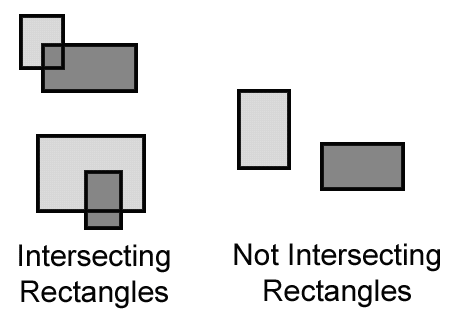
Think of items on your page as rectangles. The problem is to test to see if rectangles are intersecting or not. Use this link to get some detail of how the test can be done. The code below shows an example of how collision detection can be done in small basic.
size = 20
rbx = 20
rby = 20
rb_hspeed = 3
rb_vspeed = 3
GraphicsWindow.BrushColor = "red"
redBall = Shapes.AddEllipse(size, size)

bbx = 200
bby = 20
bb_hspeed = -3
bb_vspeed = 3
GraphicsWindow.BrushColor = "blue"
blueBall = Shapes.AddEllipse(size, size)

loop = 1

while loop = 1
bbx = bbx + bb_hspeed
bby = bby + bb_vspeed
Shapes.move(blueBall, bbx, bby)
rbx = rbx + rb_hspeed
rby = rby + rb_vspeed
Shapes.move(blueBall, rbx, rby)

if bbx + size > rbx and bbx < rbx + size and bby + size > rby and bby < rby + size then
   ????????
endif
endwhile
Using the above code your task is to get the balls to bounce off each other. They should also bounce off the walls (that is a separate task which should be completed before this one. This task requires you to do some independent research into collision detection. This is reflected in the reward!

You need to log in or create an account to submit code!